%20--%3e%3cdefs%3e%3cstyle%3e%20.st0%20{%20fill:%20%23fff;%20}%20%3c/style%3e%3c/defs%3e%3cpath%20class='st0'%20d='M37.06,124.64c1.42-.39,3.06.14,4.14.77,29.56,17.44,67.54,6.48,83.47-23.79,9.31-17.68,10.16-36.97,1.54-55.34-1.29-2.76.63-5.66,3.07-6.48,2.76-.91,5.34.33,6.56,2.99,7.71,16.78,8.53,35.39,2.51,52.8-14.32,41.46-61.44,61.08-100.66,39.6l-28.54,8.18c-1.53.44-3.51-.85-4.32-1.78-1.07-1.23-1.51-2.99-1.06-4.68l7.42-27.48C1.75,93.06-1.86,75.29,2.43,56.85,9.85,24.85,36.89,1.27,70.09.31c14.91-.43,29.09,3.99,41.7,12.54l-.36-5.47c-.17-2.66,1.42-4.88,3.81-5.4,2.05-.44,5.56.58,5.97,3.25,1.09,7.06,1.8,14.07,2.44,21.4.2,2.3-2.47,4.71-4.65,4.73l-18.11.08c-2.8,0-5.09-1.59-5.5-4.35-.35-2.36,1.31-5.56,4.1-5.59l6.44-.08C76.96,1.23,36.92,10.4,19.4,41.02c-11.87,20.72-11.49,44.19,1.31,64.59.85,1.31,1.36,2.49.93,4.03l-5.58,20.83,20.99-5.85.02.02Z'/%3e%3cpath%20class='st0'%20d='M91.43,92.7c4.29,0,7.09-3.34,6.98-7.09-.11-4.05-3.59-7.03-7.8-6.51h-20.19l3.67-10.15,16.89-.03c3.39,0,5.97-2.47,6.48-5.72.33-2.08-.3-4.22-1.58-5.63-1.45-1.59-3.44-2.1-5.64-2.1l-14.72.05,3.1-10.18c4.29-.19,8.41-.33,12.75-.13,7.66.35,14.32,5.25,16.03,12.72,1.36,5.97-.65,11.99-5.85,15.54,3.21,2.02,5.5,4.76,6.49,8.59,2.55,9.85-4.33,20.06-14.94,20.56l-32.37.2,3.73-10.07,9.74-.08h17.21v.02Z'/%3e%3cpath%20class='st0'%20d='M68.08,68.96l-3.36,10.12-18.41.03-.06,23.7h-10.38v-56.96c0-.5,1.61-.71,2.14-.71h6.97l27.17-.02-3.18,10.34-22.63.14-.03,13.33,21.78.05v-.02Z'/%3e%3c/svg%3e)
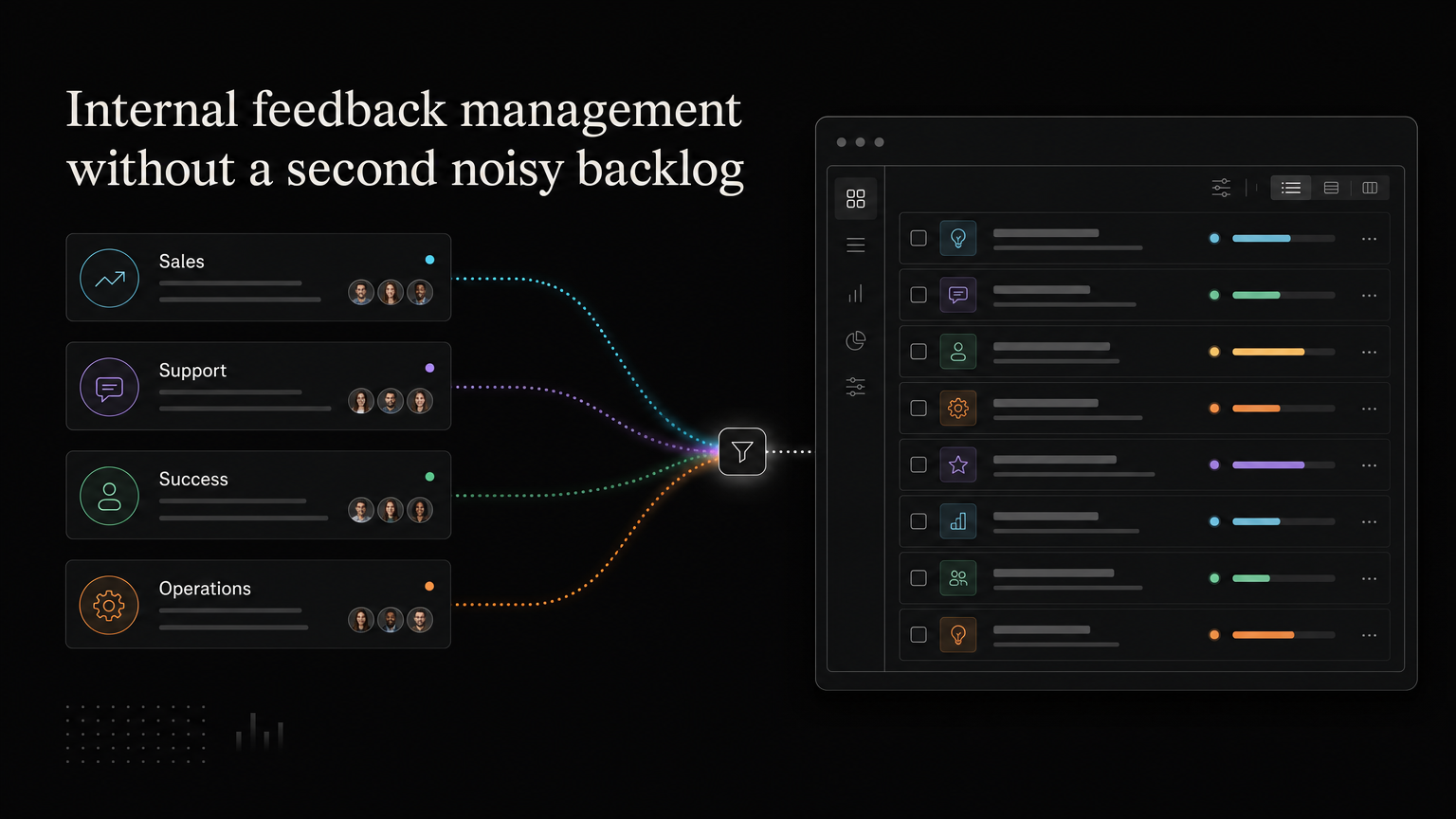
Sales, support, success, and operations hear product feedback every day. If their notes stay in separate tools, product misses patterns. If every comment becomes a backlog item, the backlog becomes unusable.
Internal feedback management creates one route from customer conversation to product evidence.
Capture the customer, not only the suggestion
An internal request should include:
- Customer or account
- Original problem
- Source conversation
- Current workaround
- Frequency or urgency
- Related request, when known
“Sales needs SSO” is weaker than “Three regulated prospects cannot complete security review without SAML SSO.”
Use one shared request record
When several teammates report the same issue, link their customer evidence to one request. Do not create separate “sales,” “support,” and “product” versions.
Keep internal notes private when they include contract value, churn risk, or sensitive context. Publish only the customer-safe summary.
Set a review contract
Internal teams need to know what happens after submission.
Define:
- Who reviews new feedback
- How quickly it is acknowledged
- Which statuses are used
- When deeper decisions happen
- How submitters receive updates
Product does not need to accept every request. It does need to make the process visible.
Avoid proxy voting
One salesperson submitting ten votes for one account can distort demand. Record the account once and preserve the strength of the evidence in notes.
Separate customer demand from internal importance. Both matter, but they answer different questions.
Close the loop with the teammate and customer
When a decision changes, notify the colleague who submitted the feedback. They can update the customer with an accurate message.
When the feature ships, send the release note to the linked accounts. This turns internal capture into better customer communication.
Feedboard gives cross-functional teams one place to record requests, attach context, follow roadmap changes, and share shipped updates. Organize internal feedback with Feedboard.
Map every internal channel
List where customer evidence currently appears:
- Support tickets and chat
- CRM notes and call recordings
- Customer-success meetings
- Onboarding sessions
- Sales engineering and security reviews
- Community discussions
- Cancellation and renewal notes
- Internal Slack or Teams channels
Choose one capture path for each. The goal is not to replace every tool. It is to ensure product evidence reaches one system of record with a link to the source.
Define evidence levels
Internal feedback varies in strength. Use a simple scale:
| Level | Evidence | Example |
|---|---|---|
| 1 | Internal assumption | “Prospects probably need this.” |
| 2 | Reported customer statement | Sales recorded one request. |
| 3 | Repeated, linked examples | Five accounts described the problem. |
| 4 | Observed behavior or consequence | Calls show the workaround; deals are blocked. |
| 5 | Tested outcome | A prototype or pilot changed behavior. |
The scale does not decide priority. It tells reviewers how confidently they understand the problem.
Create channel-specific capture rules
Support
Support should solve the immediate issue first, then attach the customer to a related request. Include the original conversation and any workaround.
Sales
Sales should record the prospect, segment, deal stage, business consequence, and whether the capability genuinely blocks the decision.
Customer success
Success should preserve recurring workflows, adoption problems, renewal risk, and the account’s desired outcome.
Operations and internal users
Internal teammates may be real users of administrative workflows. Label their role clearly so their feedback is not confused with external customer demand.
Build a weekly intake routine
A thirty-minute intake review can:
- Read new submissions.
- Merge duplicates.
- Separate bugs, questions, and requests.
- Improve titles and problem statements.
- Add missing customer context.
- Assign an owner or next review date.
The meeting is for cleaning and routing, not making every roadmap decision.
Run a monthly product review
Group feedback into themes and review:
- Unique affected accounts
- Target segments
- Frequency and severity
- Commercial or retention context
- Existing workarounds
- Strategic fit
- Confidence and unknowns
- Rough cost and opportunity cost
Choose a decision: research, plan, monitor, or decline. Give the submitting teams language they can use with customers.
Worked example
Sales submits “enterprise customers need custom dashboards.” Support has three reports about manually exporting data, and success notes that two agencies share screenshots with clients.
The team does not create three roadmap items. It groups them under:
Customer-facing teams cannot share a focused view with people outside the workspace.
Research may reveal that scheduled reports, guest access, or shareable views serve different segments. The shared problem theme keeps the evidence together without committing to “custom dashboards.”
Prevent an internal popularity contest
Do not let teammates add unlimited votes on behalf of one account. Link the account once, add context, and record urgency separately.
Do not rank departments by submission volume. Support naturally hears more problems; sales hears more buying objections. Both channels are partial views.
Protect private context
Contract values, renewal risk, personal information, and call notes should remain internal. Publish a customer-safe summary when a request belongs on a public board.
Create clear rules for recordings, sensitive attachments, and data retention.
Close the loop internally
When a state changes, notify the teammate who submitted the evidence. Provide:
- The current decision
- A customer-safe explanation
- Any expected timing range
- The next update point
- A link to the release note when shipped
This reduces repeated status questions and prevents sales or support from inventing an answer.
Metrics
Track:
- New feedback reviewed on time
- Percentage linked to a customer and source
- Duplicate rate
- Themes with multiple channels represented
- Time to product response
- Requests with an explicit decision
- Submitters and customers notified after release
Do not use raw submission count as a team performance metric. It encourages quantity over evidence.
Frequently asked questions
Should internal teams have a separate board?
They can use a private view, but link customer evidence to the same underlying request so demand does not split.
Can sales promise a feature after submitting it?
No. Define who can make commitments and use consistent request states. Logged and planned are not committed.
What happens to one-off ideas?
Keep useful context and close or monitor the item. One request can still matter, but it needs a strategic or high-severity reason rather than artificial vote volume.
Who owns the system?
A product operations lead, product manager, or founder can own it. The owner maintains quality and cadence; the product team still owns roadmap decisions.
A thirty-day rollout
During week one, map channels and select the system of record. In week two, train sales, support, and success on the intake fields and response states. In week three, clean the existing high-value requests and link their customer evidence. In week four, run the first theme review and send decisions back to submitting teams.
Start with a small taxonomy and one review cadence. Add automation only after the manual workflow produces consistent records. Automating unclear intake creates a larger, faster-moving backlog without improving product decisions.