%20--%3e%3cdefs%3e%3cstyle%3e%20.st0%20{%20fill:%20%23fff;%20}%20%3c/style%3e%3c/defs%3e%3cpath%20class='st0'%20d='M37.06,124.64c1.42-.39,3.06.14,4.14.77,29.56,17.44,67.54,6.48,83.47-23.79,9.31-17.68,10.16-36.97,1.54-55.34-1.29-2.76.63-5.66,3.07-6.48,2.76-.91,5.34.33,6.56,2.99,7.71,16.78,8.53,35.39,2.51,52.8-14.32,41.46-61.44,61.08-100.66,39.6l-28.54,8.18c-1.53.44-3.51-.85-4.32-1.78-1.07-1.23-1.51-2.99-1.06-4.68l7.42-27.48C1.75,93.06-1.86,75.29,2.43,56.85,9.85,24.85,36.89,1.27,70.09.31c14.91-.43,29.09,3.99,41.7,12.54l-.36-5.47c-.17-2.66,1.42-4.88,3.81-5.4,2.05-.44,5.56.58,5.97,3.25,1.09,7.06,1.8,14.07,2.44,21.4.2,2.3-2.47,4.71-4.65,4.73l-18.11.08c-2.8,0-5.09-1.59-5.5-4.35-.35-2.36,1.31-5.56,4.1-5.59l6.44-.08C76.96,1.23,36.92,10.4,19.4,41.02c-11.87,20.72-11.49,44.19,1.31,64.59.85,1.31,1.36,2.49.93,4.03l-5.58,20.83,20.99-5.85.02.02Z'/%3e%3cpath%20class='st0'%20d='M91.43,92.7c4.29,0,7.09-3.34,6.98-7.09-.11-4.05-3.59-7.03-7.8-6.51h-20.19l3.67-10.15,16.89-.03c3.39,0,5.97-2.47,6.48-5.72.33-2.08-.3-4.22-1.58-5.63-1.45-1.59-3.44-2.1-5.64-2.1l-14.72.05,3.1-10.18c4.29-.19,8.41-.33,12.75-.13,7.66.35,14.32,5.25,16.03,12.72,1.36,5.97-.65,11.99-5.85,15.54,3.21,2.02,5.5,4.76,6.49,8.59,2.55,9.85-4.33,20.06-14.94,20.56l-32.37.2,3.73-10.07,9.74-.08h17.21v.02Z'/%3e%3cpath%20class='st0'%20d='M68.08,68.96l-3.36,10.12-18.41.03-.06,23.7h-10.38v-56.96c0-.5,1.61-.71,2.14-.71h6.97l27.17-.02-3.18,10.34-22.63.14-.03,13.33,21.78.05v-.02Z'/%3e%3c/svg%3e)
Bug reports and feature requests often arrive through the same channel, but they need different workflows.
A bug is behavior that contradicts a reasonable expectation. A feature request asks for a new capability or different outcome. Misclassifying them creates slow incident response and a cluttered roadmap.
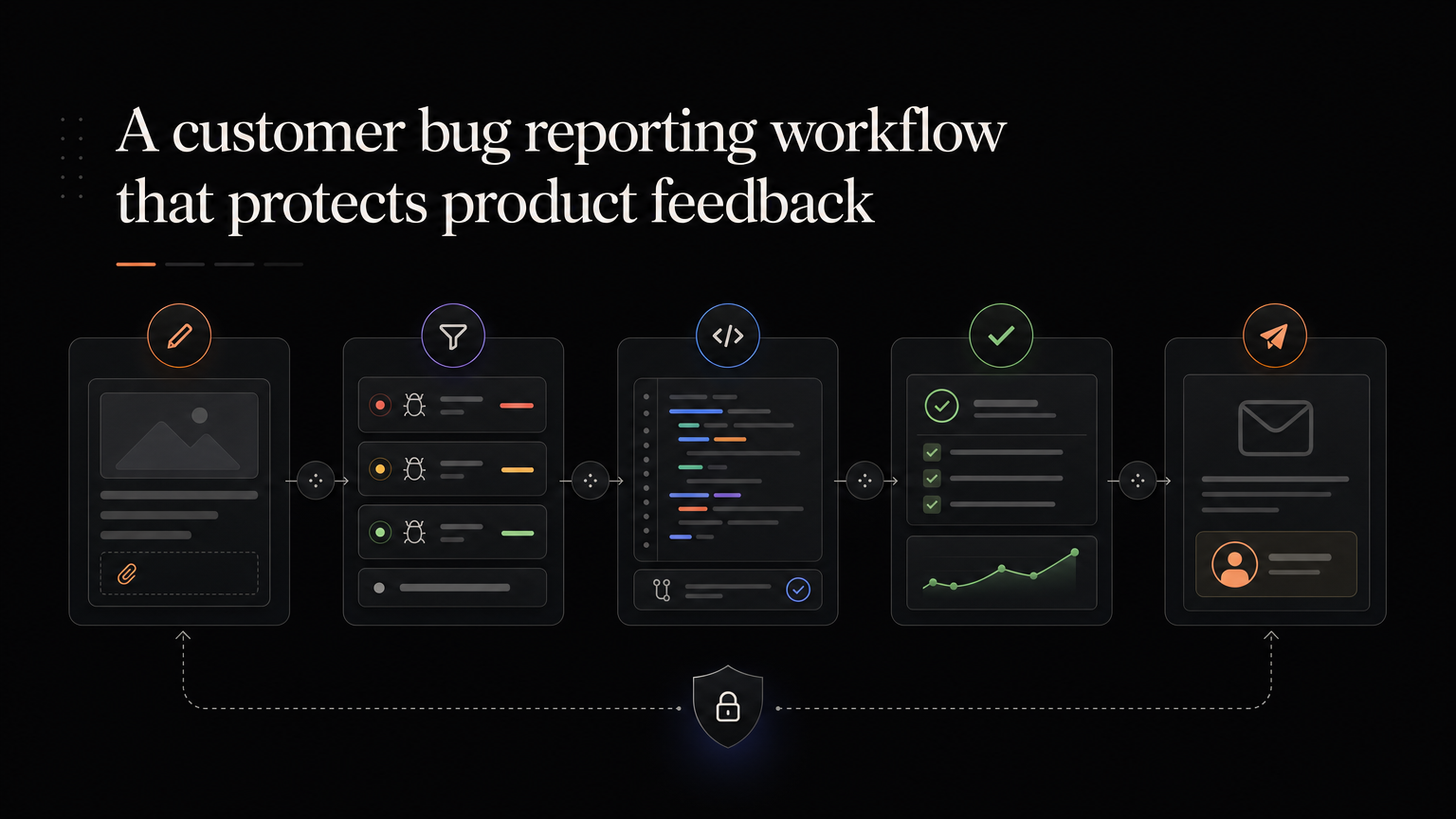
Collect reproducible details
Ask for:
- What the customer expected
- What happened
- Steps to reproduce
- Browser, device, app version, or integration
- Time and account
- Screenshot or recording
- Business impact
Do not make the customer prove the defect before acknowledging it.
Triage by impact
Severity should reflect customer harm:
- Critical: security, data loss, or core service unavailable
- High: key workflow blocked with no practical workaround
- Medium: workflow impaired but usable
- Low: minor or cosmetic issue
Popularity is not severity. One data-loss report can outrank fifty visual complaints.
Keep systems connected
Engineering work belongs in the issue tracker. Customer-facing status belongs in the support or feedback system.
Link the records so support can see progress without exposing internal logs, security details, or developer discussion.
Look for product themes
A repeated “bug” may reveal a confusing design, missing validation, poor documentation, or a fragile product area.
Group related reports and review the pattern. Fixing one defect may not solve the broader customer problem.
Close the loop
Tell affected customers when the issue is confirmed, when a workaround exists, and when the fix is available. Include any action they need to take.
For meaningful fixes, publish a short changelog entry. Customers should not need to test the broken workflow every day to discover that it works again.
Feedboard can hold the customer-facing report and status while your engineering tracker manages implementation. Keep customers updated with Feedboard.
Design the bug intake form
A reporting form should collect enough information to begin an investigation without asking the customer to diagnose your product.
Use:
What were you trying to do?
What did you expect?
What happened instead?
When did it happen?
Can you reproduce it?
Which workspace, browser, device, or integration was involved?
Optional screenshot or recording:
How is this affecting your work?
Attach account, plan, product version, and recent diagnostic identifiers automatically when privacy rules allow. Customers should not need to locate information your product already knows.
Do not require a video, console log, or perfect reproduction before accepting a report. Those details can help, but a serious intermittent problem still deserves investigation.
Separate severity from priority
Severity describes customer harm. Priority describes when the team will act.
| Severity | Customer impact | Example |
|---|---|---|
| Critical | Security risk, data loss, or service unavailable | Customers can access another account’s files |
| High | Core workflow blocked without a practical workaround | Paid invoices cannot be created |
| Medium | Workflow impaired but still possible | Bulk editing fails; individual edits work |
| Low | Minor issue with little functional effect | Text overlaps at one screen size |
A low-volume report can be critical. A popular cosmetic bug can be low severity. Record affected accounts and frequency separately.
Priority also considers strategic accounts, contractual obligations, engineering dependencies, and the risk of waiting. Make those factors visible instead of changing the severity label to force attention.
Create the handoff between support and engineering
Support owns acknowledgement and customer context. Engineering owns technical diagnosis and repair. Product or operations may own prioritization across recurring issues.
The handoff should include:
- A concise problem statement
- Reproduction steps and environment
- First and most recent occurrence
- Affected customers
- Severity and rationale
- Logs or identifiers
- Workaround
- Link to the customer-facing record
Engineering discussion can remain private. Support needs a readable state, expected next update, and customer-safe explanation.
Use service levels carefully
Set targets for acknowledgement and triage, not repair dates you cannot predict.
For example:
- Critical reports acknowledged within thirty minutes
- High-severity reports triaged within four business hours
- Medium reports triaged within two business days
- Low reports reviewed during the weekly quality review
The target should match your team and customer promise. Publish only service levels you can staff.
For long investigations, send progress updates even when the status has not changed. “We reproduced the failure and are testing a fix” is more useful than silence.
Worked example
A customer reports that scheduled exports sometimes contain no rows.
Support records the workspace, report, schedule, time zone, last successful delivery, and a sample empty file. The report is marked high severity because a weekly client workflow is blocked.
Engineering discovers that schedules created during a daylight-saving transition use the wrong time range. The team:
- Pauses affected schedules.
- Provides a manual export workaround.
- Fixes time-range calculation.
- Tests multiple time zones.
- Restarts schedules.
- Notifies every affected account.
- Publishes a release note explaining the fix.
The linked feedback reveals a broader request: customers want a visible delivery history. That request enters product review separately from the defect.
Handle duplicate reports
Merge reports that share the same cause, but keep every affected customer linked. Duplicate volume helps estimate reach and lets you notify everyone after repair.
Do not merge merely because titles sound similar. “Export is empty” could have different causes across permissions, filters, time zones, and data volume.
Verify before closing
Engineering confirmation is necessary but not always sufficient.
Verify:
- The original reproduction no longer fails
- Automated coverage protects the behavior
- Monitoring detects recurrence
- The workaround can be retired
- Documentation reflects the current product
- Affected customers received an update
Ask the original reporter to confirm when the issue depends on their environment. Do not make closure depend on a reply if internal evidence is conclusive.
Learn from recurring bugs
A monthly review should look beyond individual tickets:
- Which product areas create repeated incidents?
- Which defects escape testing?
- Which reports take longest to reproduce?
- Where do customers lack a workaround?
- Which “bugs” are actually confusing design?
- How many fixes are reopened?
Repeated defects in one area may justify a roadmap outcome for reliability, observability, or simplification.
Metrics that improve the workflow
Track:
- Time to first acknowledgement
- Time to severity decision
- Time to reproduction
- Time to mitigation and repair
- Affected customers
- Reopen rate
- Percentage of affected customers notified
- Repeat incidents by product area
Median and high-percentile times are more informative than one average distorted by a major incident.
Frequently asked questions
Should bugs appear on a public feedback board?
Customer-safe reports can have a visible status, especially when many users are affected. Keep security details, logs, and private account context internal.
Should customers vote on bugs?
Votes can show reach but should not determine severity. Security and data-loss reports need action regardless of popularity.
When does a bug become a feature request?
Fixing behavior that violates a reasonable expectation is defect work. Expanding the supported outcome is a request. One customer conversation may contain both, so create linked records.
What if the issue belongs to a third-party integration?
Own the customer investigation. Explain the dependency, provide a workaround when possible, and keep the customer updated while the external provider resolves its part.