%20--%3e%3cdefs%3e%3cstyle%3e%20.st0%20{%20fill:%20%23fff;%20}%20%3c/style%3e%3c/defs%3e%3cpath%20class='st0'%20d='M37.06,124.64c1.42-.39,3.06.14,4.14.77,29.56,17.44,67.54,6.48,83.47-23.79,9.31-17.68,10.16-36.97,1.54-55.34-1.29-2.76.63-5.66,3.07-6.48,2.76-.91,5.34.33,6.56,2.99,7.71,16.78,8.53,35.39,2.51,52.8-14.32,41.46-61.44,61.08-100.66,39.6l-28.54,8.18c-1.53.44-3.51-.85-4.32-1.78-1.07-1.23-1.51-2.99-1.06-4.68l7.42-27.48C1.75,93.06-1.86,75.29,2.43,56.85,9.85,24.85,36.89,1.27,70.09.31c14.91-.43,29.09,3.99,41.7,12.54l-.36-5.47c-.17-2.66,1.42-4.88,3.81-5.4,2.05-.44,5.56.58,5.97,3.25,1.09,7.06,1.8,14.07,2.44,21.4.2,2.3-2.47,4.71-4.65,4.73l-18.11.08c-2.8,0-5.09-1.59-5.5-4.35-.35-2.36,1.31-5.56,4.1-5.59l6.44-.08C76.96,1.23,36.92,10.4,19.4,41.02c-11.87,20.72-11.49,44.19,1.31,64.59.85,1.31,1.36,2.49.93,4.03l-5.58,20.83,20.99-5.85.02.02Z'/%3e%3cpath%20class='st0'%20d='M91.43,92.7c4.29,0,7.09-3.34,6.98-7.09-.11-4.05-3.59-7.03-7.8-6.51h-20.19l3.67-10.15,16.89-.03c3.39,0,5.97-2.47,6.48-5.72.33-2.08-.3-4.22-1.58-5.63-1.45-1.59-3.44-2.1-5.64-2.1l-14.72.05,3.1-10.18c4.29-.19,8.41-.33,12.75-.13,7.66.35,14.32,5.25,16.03,12.72,1.36,5.97-.65,11.99-5.85,15.54,3.21,2.02,5.5,4.76,6.49,8.59,2.55,9.85-4.33,20.06-14.94,20.56l-32.37.2,3.73-10.07,9.74-.08h17.21v.02Z'/%3e%3cpath%20class='st0'%20d='M68.08,68.96l-3.36,10.12-18.41.03-.06,23.7h-10.38v-56.96c0-.5,1.61-.71,2.14-.71h6.97l27.17-.02-3.18,10.34-22.63.14-.03,13.33,21.78.05v-.02Z'/%3e%3c/svg%3e)
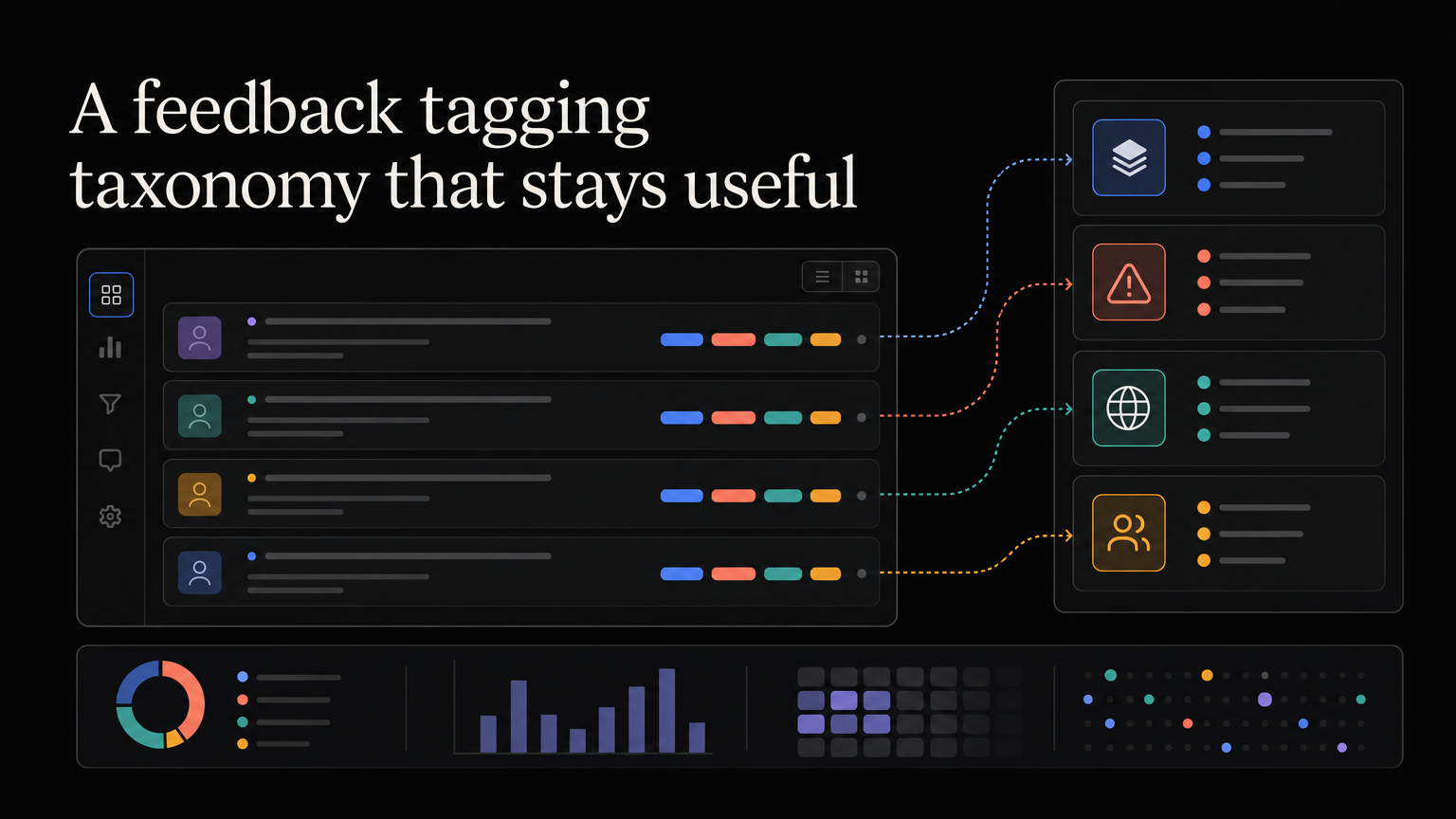
Tags help teams find patterns. Too many tags create another mess to maintain.
Start with the decisions you need to make, then create the smallest taxonomy that supports them.
Use four tag groups
Product area
Examples: onboarding, reporting, billing, permissions.
Problem type
Examples: missing capability, confusing workflow, reliability, performance, integration.
Source
Examples: support, sales, feedback board, interview, cancellation.
Customer context
Examples: free plan, paid, enterprise, agency, developer.
Keep workflow status in a dedicated status field rather than a tag when possible.
Write tagging rules
Define each tag in one sentence and include an example. “Reporting” should not mean analytics to one person and exports to another.
Choose whether multiple tags are allowed in each group. Product area may allow two; source should usually have one.
Avoid sentiment-only analysis
Positive and negative tags rarely explain what the team should do. Pair sentiment with the problem and workflow.
Review the taxonomy
Each quarter:
- Merge synonyms
- Remove unused tags
- Split tags that are too broad
- Correct inconsistent use
- Keep historical mapping when renaming
Do not create a new tag for one comment. Use notes until the pattern repeats.
Preserve the original words
Tags are an index, not the evidence. Keep the comment, customer, source, and context attached.
Build the taxonomy from real feedback
Take a sample of fifty to one hundred recent comments and tag them manually. Review where two people used different labels for the same problem. Merge synonyms, split categories that contain almost everything, and avoid creating a permanent tag for one unusual request.
A useful first version usually has six to twelve product areas, four to eight problem types, a fixed list of sources, and the customer segments already used by the business.
| Group | Examples | Question answered |
|---|---|---|
| Product area | Onboarding, reporting, billing | Where does it happen? |
| Problem | Missing, confusing, slow, unreliable | What is wrong? |
| Source | Support, sales, interview, churn | Where did we hear it? |
| Segment | Free, paid, enterprise, agency | Who is affected? |
| Evidence | Observed, requested, inferred | How strong is the signal? |
Govern changes
Give one person ownership of definitions. Teammates can suggest new labels, but the owner checks whether an existing tag covers the case and documents the decision.
Once a month, have two people tag the same sample independently. Disagreement means the definition is unclear, the category is too broad, or the original feedback lacks context.
Use tags in decisions
A tag is useful only when it supports a question. Review trends by recent period, unique account, and target segment. Ten messages from one blocked customer show severity, but they are not ten affected accounts.
Combine tag counts with representative comments, current workarounds, product behavior, and business impact. “Reporting increased 20%” is not a decision. “Five agencies manually email the same report every week” is a research lead.
Frequently asked questions
Should every item be tagged?
Every reviewed item should have a product area and problem type. New or ambiguous feedback can remain untagged briefly while someone clarifies it.
Can AI apply tags?
Automation can suggest labels at high volume. Test it on a reviewed sample and measure accuracy before trusting reports. New language and ambiguous requests still need judgment.
Should feature names become tags?
Only when the feature is a stable product area. Temporary project names make the taxonomy stale as soon as the roadmap changes.
Feedboard helps teams group related feedback without losing the customer story behind it. Organize feedback with Feedboard.
Separate tags from fields
Use structured fields when a value should have one controlled answer:
- Source
- Customer plan
- Request status
- Product area
- Submitted date
Use tags for flexible classification such as workflow themes or research campaigns. This prevents one item from having “support,” “sales,” and “interview” as competing source tags.
Design hierarchical product areas
A growing product may need:
Reporting
  - Dashboard
  - Export
  - Scheduled delivery
Permissions
  - Roles
  - Guest access
  - Approval
Limit the hierarchy to the depth people can apply consistently. A three-level taxonomy with dozens of leaves often produces false precision.
Tag at the most specific confident level and preserve the broader parent for reporting.
Create a change policy
Before adding a tag, ask:
- Which decision will it support?
- Does an existing tag cover the meaning?
- Has the pattern appeared more than once?
- Can a reviewer apply it consistently?
- Who owns the definition?
When retiring a tag, map old records to the replacement or document that historical reports changed.
Example: from comments to report
Suppose the team receives:
- “I email screenshots to clients.”
- “Guests can see too much.”
- “Can I share one dashboard without inviting someone?”
Product-area tags alone split these between reporting and permissions. A cross-cutting theme such as “external sharing” reveals the shared customer job.
The report should show both:
- Product area for ownership
- Problem theme for opportunity discovery
Automate carefully
Suggested tags can reduce manual work. Build a reviewed test set and measure precision for each important label.
Use confidence thresholds:
- High confidence: apply automatically
- Medium: suggest for review
- Low: leave untagged
Monitor new language, because a model trained on last quarter’s feedback may force emerging problems into old categories.
Build useful dashboards
Report:
- Unique accounts by theme
- Recent trend
- Segment distribution
- Source distribution
- Median time to decision
- Linked roadmap and release outcomes
Avoid a dashboard containing every tag count. Start with questions product leaders actually review.
Taxonomy maintenance meeting
Quarterly, review:
- Tags with no recent use
- Categories containing too much feedback
- Common reviewer disagreements
- New product areas
- Duplicate or synonymous labels
- Themes that became stable workflows
- Automated tagging accuracy
Publish the change log to everyone who tags feedback.
A starter specification
Required fields:
  Product area: one
  Problem type: one
  Source: one
  Customer: one when known

Optional:
  Cross-cutting themes: up to three
  Research campaign: zero or one
  Severity: when the problem is operational

Never public:
  Revenue context
  Private account notes
  Personal data
Adjust the limits based on the product, but keep the rules simple enough to teach in fifteen minutes.
More FAQs
Who should tag feedback?
The person receiving it can apply obvious fields. A feedback owner should review ambiguous items, merges, and new taxonomy requests.
Can one item belong to two product areas?
Yes when the workflow genuinely crosses areas. Use it sparingly and assign one primary owner.
Should roadmap themes reuse feedback tags?
They can share stable problem language. Do not rename feedback history every time a quarterly roadmap theme changes.
How is taxonomy success measured?
Review consistency, time to classify, percentage of useful records, and whether reports lead to clearer research or roadmap decisions.
Retire any tag that creates maintenance without informing a recurring question.