%20--%3e%3cdefs%3e%3cstyle%3e%20.st0%20{%20fill:%20%23fff;%20}%20%3c/style%3e%3c/defs%3e%3cpath%20class='st0'%20d='M37.06,124.64c1.42-.39,3.06.14,4.14.77,29.56,17.44,67.54,6.48,83.47-23.79,9.31-17.68,10.16-36.97,1.54-55.34-1.29-2.76.63-5.66,3.07-6.48,2.76-.91,5.34.33,6.56,2.99,7.71,16.78,8.53,35.39,2.51,52.8-14.32,41.46-61.44,61.08-100.66,39.6l-28.54,8.18c-1.53.44-3.51-.85-4.32-1.78-1.07-1.23-1.51-2.99-1.06-4.68l7.42-27.48C1.75,93.06-1.86,75.29,2.43,56.85,9.85,24.85,36.89,1.27,70.09.31c14.91-.43,29.09,3.99,41.7,12.54l-.36-5.47c-.17-2.66,1.42-4.88,3.81-5.4,2.05-.44,5.56.58,5.97,3.25,1.09,7.06,1.8,14.07,2.44,21.4.2,2.3-2.47,4.71-4.65,4.73l-18.11.08c-2.8,0-5.09-1.59-5.5-4.35-.35-2.36,1.31-5.56,4.1-5.59l6.44-.08C76.96,1.23,36.92,10.4,19.4,41.02c-11.87,20.72-11.49,44.19,1.31,64.59.85,1.31,1.36,2.49.93,4.03l-5.58,20.83,20.99-5.85.02.02Z'/%3e%3cpath%20class='st0'%20d='M91.43,92.7c4.29,0,7.09-3.34,6.98-7.09-.11-4.05-3.59-7.03-7.8-6.51h-20.19l3.67-10.15,16.89-.03c3.39,0,5.97-2.47,6.48-5.72.33-2.08-.3-4.22-1.58-5.63-1.45-1.59-3.44-2.1-5.64-2.1l-14.72.05,3.1-10.18c4.29-.19,8.41-.33,12.75-.13,7.66.35,14.32,5.25,16.03,12.72,1.36,5.97-.65,11.99-5.85,15.54,3.21,2.02,5.5,4.76,6.49,8.59,2.55,9.85-4.33,20.06-14.94,20.56l-32.37.2,3.73-10.07,9.74-.08h17.21v.02Z'/%3e%3cpath%20class='st0'%20d='M68.08,68.96l-3.36,10.12-18.41.03-.06,23.7h-10.38v-56.96c0-.5,1.61-.71,2.14-.71h6.97l27.17-.02-3.18,10.34-22.63.14-.03,13.33,21.78.05v-.02Z'/%3e%3c/svg%3e)
Most companies collect feedback. Far fewer complete the loop.
A survey is sent, a support ticket is tagged, or a request is copied into a backlog. The customer hears nothing after that. From their side, the feedback disappeared.
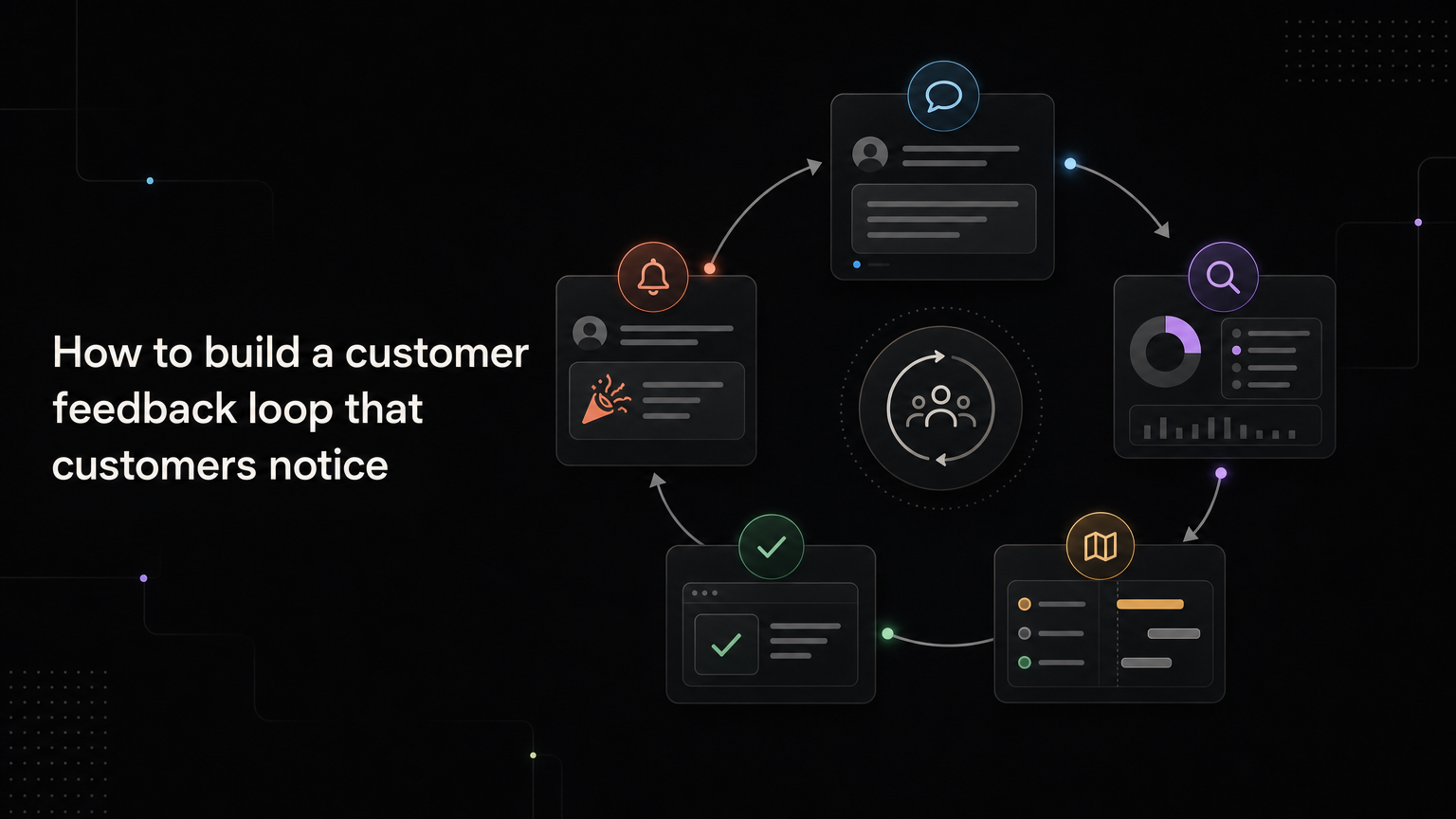
A customer feedback loop turns that one-way collection into an ongoing exchange. The team listens, confirms what it heard, investigates, makes a decision, and reports back.
What is a customer feedback loop?
A customer feedback loop is a five-part process:
- Collect feedback
- Organize and understand it
- Decide what to do
- Act on the decision
- Tell the customer what happened
The fifth step creates the loop. Without it, you have a feedback inbox.
Closing the loop does not mean building every request. A useful response may say that the team fixed the issue, added the idea to its roadmap, needs more information, or has decided not to pursue it.
Step 1: collect feedback where it happens
Customers share different kinds of feedback in different places.
Support tickets reveal friction. Sales calls expose missing capabilities. Cancellation forms show why customers leave. A public feedback board captures deliberate suggestions. Product analytics shows what people do, including the actions they abandon.
Do not force customers into one channel. Route the useful information from each channel into a shared system.
Record:
- The customer and account
- Their original words
- The source
- The affected workflow
- Any request or problem it relates to
The original wording matters. A summary such as “needs better reporting” can erase the detail that makes the problem understandable.
Step 2: acknowledge quickly
Customers should not wait for a roadmap decision before hearing from you.
A short acknowledgement is enough:
Thanks for sharing this. I have linked your note to our reporting feedback so the product team can review it. I may follow up with a few questions.
This confirms that the message reached a person and sets a realistic expectation.
Do not use “we’ll pass it to the team” as a dead end. If that phrase appears, make sure the feedback is actually recorded and traceable.
Step 3: find the problem behind the request
When feedback could influence a decision, ask for context.
Good follow-up questions include:
- What were you trying to do?
- What happened instead?
- How often do you run into this?
- Who else on your team is affected?
- What workaround do you use?
- What would change if this were solved?
Avoid asking whether the customer would “use” a feature. People are generous with hypothetical yeses. Ask about current behavior and a specific outcome.
Step 4: decide in batches
Reacting to each message separately creates a noisy roadmap. Review related feedback together on a schedule.
During the review, consider:
- Frequency and severity
- Fit with the target customer
- Strategic relevance
- Retention or revenue impact
- Reach
- Effort, risk, and opportunity cost
- Confidence in the evidence
Record the result so support, sales, and product give the same answer.
Useful public states include under review, planned, in progress, shipped, and not planned. Internally, add the decision reason and the date it should be revisited.
Step 5: close the loop at every meaningful change
Do not wait until launch day.
Send an update when:
- The team needs more information
- Research begins
- The request moves to the roadmap
- A beta becomes available
- The feature ships
- The team decides not to proceed
The message should answer three questions: what changed, what it means for this customer, and what happens next.
For a shipped improvement:
Saved report filters are now available. You can create a filter from the Reports page and reuse it across your workspace. Here is the release note with the setup steps.
For a declined request:
We reviewed offline editing, but it is not something we plan to build this year. We are focusing on making the mobile online workflow faster. I have kept your use case attached in case that direction changes.
Clarity is kinder than indefinite review.
Give each channel an owner
A feedback loop crosses teams, so ownership can disappear between them.
Define who handles each part:
| Part | Owner |
|---|---|
| Capture and acknowledgement | The team receiving the feedback |
| Deduplication and tagging | Feedback board owner |
| Research | Product manager or founder |
| Decision | Product leadership |
| Customer update | Product, support, or success |
The names can differ. The point is that every handoff is explicit.
Measure whether the loop works
Track a few operational metrics:
- Time to first acknowledgement
- Percentage of feedback linked to a known request or theme
- Median time in “under review”
- Percentage of shipped changes sent to original requesters
- Customer replies or engagement with update messages
Survey volume alone is not a success metric. A small amount of feedback that reaches a decision is more useful than a large inbox nobody reviews.
Start with one complete loop
Choose one feedback source, one board, one review meeting, and one update channel. Complete the loop for a month before adding more automation.
Feedboard keeps feedback, roadmap decisions, and changelog posts connected, so the people who asked can see what happened. Create your feedback loop with Feedboard.
Worked loop example
A customer asks for reusable report filters through support. The agent links the account to an existing theme and acknowledges the request.
Product interviews three recent requesters and discovers that agencies rebuild filters for every client. The team plans saved filters, moves the outcome to the roadmap, and invites the requesters to a beta.
After release, a changelog post explains setup and availability. Every linked requester receives the update. Adoption and repeat use are reviewed thirty days later.
The loop contains several responses, not one launch-day message.
Feedback-loop health check
Review monthly:
- Are new submissions acknowledged?
- Are duplicates merged without losing customers?
- Do themes have owners?
- Are “under review” items moving to decisions?
- Do roadmap changes reach requesters?
- Are release notes connected to original problems?
- Are declined requests closed clearly?
Use response templates carefully
Templates should create consistency without pretending every case is identical. Add the customer’s workflow, current state, and next update.
Avoid “Thanks, we value your feedback” when no action or expectation follows.
Frequently asked questions
Must every customer receive a personal reply?
Every identified requester should receive a relevant status update. Automation can deliver it, but the message should match the request.
How long should feedback remain under review?
Set a review cadence and owner. If evidence is insufficient, say what is needed or close the item rather than leaving it indefinitely.
Does closing the loop improve retention?
It can improve trust and discovery, but measure customer behavior and retention rather than assuming the relationship.
Review loop health by customer segment. A fast response for enterprise accounts and silence for smaller customers can hide behind one acceptable average.