%20--%3e%3cdefs%3e%3cstyle%3e%20.st0%20{%20fill:%20%23fff;%20}%20%3c/style%3e%3c/defs%3e%3cpath%20class='st0'%20d='M37.06,124.64c1.42-.39,3.06.14,4.14.77,29.56,17.44,67.54,6.48,83.47-23.79,9.31-17.68,10.16-36.97,1.54-55.34-1.29-2.76.63-5.66,3.07-6.48,2.76-.91,5.34.33,6.56,2.99,7.71,16.78,8.53,35.39,2.51,52.8-14.32,41.46-61.44,61.08-100.66,39.6l-28.54,8.18c-1.53.44-3.51-.85-4.32-1.78-1.07-1.23-1.51-2.99-1.06-4.68l7.42-27.48C1.75,93.06-1.86,75.29,2.43,56.85,9.85,24.85,36.89,1.27,70.09.31c14.91-.43,29.09,3.99,41.7,12.54l-.36-5.47c-.17-2.66,1.42-4.88,3.81-5.4,2.05-.44,5.56.58,5.97,3.25,1.09,7.06,1.8,14.07,2.44,21.4.2,2.3-2.47,4.71-4.65,4.73l-18.11.08c-2.8,0-5.09-1.59-5.5-4.35-.35-2.36,1.31-5.56,4.1-5.59l6.44-.08C76.96,1.23,36.92,10.4,19.4,41.02c-11.87,20.72-11.49,44.19,1.31,64.59.85,1.31,1.36,2.49.93,4.03l-5.58,20.83,20.99-5.85.02.02Z'/%3e%3cpath%20class='st0'%20d='M91.43,92.7c4.29,0,7.09-3.34,6.98-7.09-.11-4.05-3.59-7.03-7.8-6.51h-20.19l3.67-10.15,16.89-.03c3.39,0,5.97-2.47,6.48-5.72.33-2.08-.3-4.22-1.58-5.63-1.45-1.59-3.44-2.1-5.64-2.1l-14.72.05,3.1-10.18c4.29-.19,8.41-.33,12.75-.13,7.66.35,14.32,5.25,16.03,12.72,1.36,5.97-.65,11.99-5.85,15.54,3.21,2.02,5.5,4.76,6.49,8.59,2.55,9.85-4.33,20.06-14.94,20.56l-32.37.2,3.73-10.07,9.74-.08h17.21v.02Z'/%3e%3cpath%20class='st0'%20d='M68.08,68.96l-3.36,10.12-18.41.03-.06,23.7h-10.38v-56.96c0-.5,1.61-.71,2.14-.71h6.97l27.17-.02-3.18,10.34-22.63.14-.03,13.33,21.78.05v-.02Z'/%3e%3c/svg%3e)
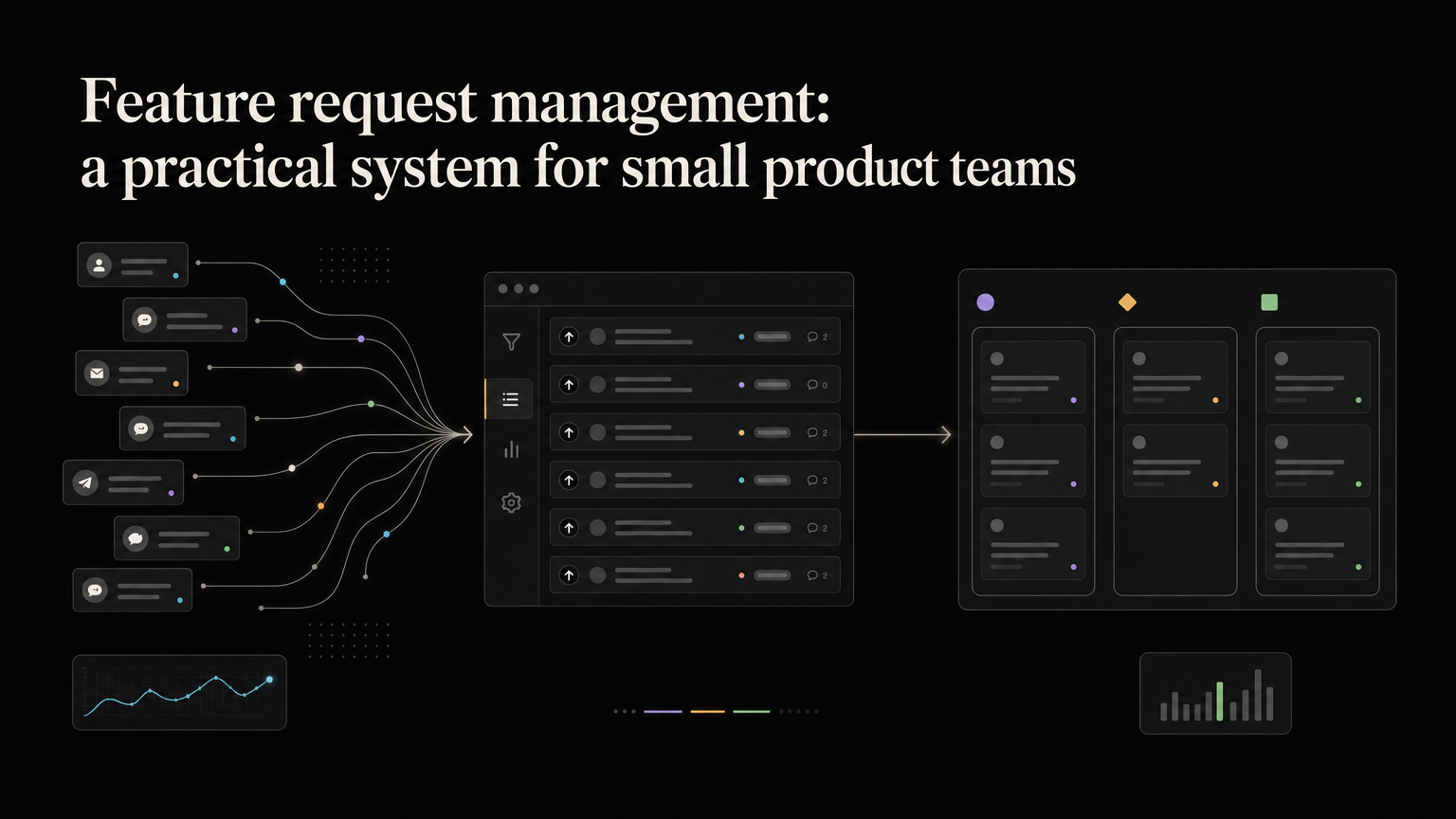
Feature requests arrive everywhere: support tickets, sales calls, Slack messages, email, and the five-minute chat someone had with a customer last Tuesday.
The problem is rarely a lack of feedback. It is the gap between hearing a request and making a good product decision with it.
Feature request management is the system that closes that gap. It gives your team one place to capture requests, combine duplicates, add context, decide what matters, and update the people who asked.
What is feature request management?
Feature request management is the process of handling customer suggestions from first mention to final outcome.
A complete process answers six questions:
- Where should a request be recorded?
- Is it new, or does a similar request already exist?
- Who needs it, and what are they trying to achieve?
- How does it fit the product strategy?
- What decision did the team make?
- How will the customer hear about that decision?
The last question is easy to ignore. It is also where much of the value appears. Customers are more likely to keep sharing useful feedback when they can see that someone read it and acted on it.
Why a spreadsheet stops working
A spreadsheet is often the right starting point. It is cheap, familiar, and flexible. Trouble begins when the volume grows.
Duplicates split demand across several rows. Context gets buried in notes. Sales cannot tell whether a request is already planned. Customers keep asking for updates because the spreadsheet has no public view or notification path.
The spreadsheet has become an archive, not a workflow.
You need a dedicated process when your team regularly asks:
- “Has anyone requested this before?”
- “Which customers are waiting for it?”
- “Why did we decide against this?”
- “Did we tell the original requester that it shipped?”
A six-step feature request workflow
1. Capture requests in one place
Customers do not need to use one channel, but your team needs one system of record.
Let support, sales, success, and product keep working in their normal tools. Give each team a fast way to send a request to the central board. Record the customer, company, source, and original wording when possible.
Do not force every comment into a feature-shaped box. “Reporting is confusing” is not yet a request. Save the problem first. The right solution may be documentation, design, or a small change rather than a new feature.
2. Merge duplicates
Five requests for “CSV export” are one product problem with five interested customers.
Merge similar requests under a clear title, but keep the individual notes. The details often differ. One person may need a weekly finance export while another wants a one-time migration file. That context helps you avoid building a generic solution that satisfies neither.
3. Ask why
A vote measures interest. It does not explain the job the customer is trying to complete.
For promising requests, ask:
- What are you doing today instead?
- How often does this problem occur?
- Who is affected?
- What happens if you cannot solve it?
- What would a good outcome look like?
These questions separate a casual preference from a painful recurring problem.
4. Add product context
Before prioritizing, connect each request to the information your team actually uses:
- Customer segment or plan
- Number of affected accounts
- Revenue or renewal risk, when relevant
- Strategic theme
- Expected impact
- Rough effort and uncertainty
This prevents the board from becoming a popularity contest. Twenty low-context votes should not automatically beat three detailed requests from the audience your product is built to serve.
5. Make and record a decision
Every reviewed request needs an explicit state. A simple set is enough:
- Under review
- Planned
- In progress
- Shipped
- Not planned
“Not planned” is a useful outcome. It clears the queue and prevents the same debate from restarting every month. Add a short internal reason so future teammates understand the decision.
Avoid promising exact dates too early. A roadmap communicates direction; a project plan manages delivery.
6. Close the loop
When a request changes state, tell the people who asked.
A good update is short:
You asked for saved filters. We have started working on them, and the feature is now on our roadmap. We will send another update when it is ready.
When the feature ships, link to the release note and explain what changed. The customer should not need to rediscover the feature by accident.
How to prioritize feature requests
There is no universal score that makes product decisions for you. Use a small set of inputs your team can apply consistently.
A practical review asks:
- Does this support the current product strategy?
- How many target customers have the problem?
- How severe and frequent is it?
- Will solving it help retention, activation, or revenue?
- What is the smallest useful version?
- What will this displace?
The displacement question matters. Every yes to one feature is a no, or at least a delay, to something else.
Review requests on a regular cadence. Weekly works for fast-moving teams; monthly may be enough for a smaller product. The goal is a predictable decision process, not constant roadmap churn.
Metrics worth tracking
Count outcomes, not just submissions.
Useful measures include:
- Median time from submission to first response
- Percentage of new requests merged into existing requests
- Requests reviewed per month
- Time spent in “under review”
- Customers notified when a request ships
- Engagement with shipped-feature announcements
A growing request count can mean healthy engagement or an unmanaged backlog. Response time and closure rate tell you which one it is.
Keep the system lighter than the problem
A feature request process should reduce work. If every request needs ten fields, a scoring workshop, and three approvals, people will route around it.
Start with one board, a few statuses, clear ownership, and a monthly review. Add segmentation or scoring only when a real decision requires it.
Feedboard gives software teams a shared place for customer feedback, roadmap updates, and release announcements. Start with Feedboard and build the workflow before the backlog builds itself.
A monthly operating checklist
Review new and stale requests, merge duplicates, confirm customer links, and update public states. Then choose the small set of themes that deserve discovery or a roadmap decision.
For each planned request, verify the intended customer outcome, owner, success measure, smallest useful scope, and next customer update. For declined work, record the reason and notify linked requesters.
Quarterly, inspect whether shipped requests changed adoption, retention, support volume, or the original customer workflow. A request system is not successful because cards reach “shipped”; it succeeds when the selected work creates the expected value and customers understand what changed.
Keep intake, decision, delivery, and communication connected, but do not collapse them into one overloaded status. That separation lets customers follow progress while the team preserves honest uncertainty.
Audit the workflow after major team or product changes. Old categories, owners, and response expectations can quietly make an otherwise healthy request system unreliable.